

In recent years, the way we interact with technology has changed dramatically. We no longer just “click a button”: we talk to voice assistants, gesture in front of cameras, and overlay digital elements onto the real world through glasses and smartphones. All of this has a name: multimodal design.
In simple terms, it means designing experiences where different modes of input and output coexist — voice, gesture, augmented reality (AR), gaze — creating interactions that feel more natural and intuitive.
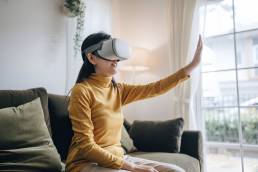
From voice to gesture: why one channel isn’t enough
Voice is the most obvious starting point. It’s natural, fast, frees up your hands, and is now supported by increasingly accurate speech recognition models. But it’s not perfect: in a noisy environment, your “what time is it?” might easily turn into “I didn’t catch that.”
That’s where the second mode comes in: gestures. Pointing with your finger, pinching to zoom, rotating an object in space — simple movements that enrich and complete voice commands. In AR, for example, you can say “place the chair there” while pointing to the exact spot with your hand: the technology combines both inputs to better understand what you mean.
And then there’s AR itself, which turns the environment around us into an interface. Here, multimodal design becomes almost magical: you see a digital object appear in front of you, control it with your voice, and move it with a gesture.
The challenges (and how to face them)
Of course, it’s not all smooth sailing. Designing multimodal experiences means dealing with three major challenges:
- Signal fusion: What happens if the voice command and the gesture don’t match? Which one should take priority?
- Ambiguity: Words like “there” or “that one” only make sense when paired with a gesture or a visual context.
- Fatigue: Nobody wants to hold their arms up for half an hour. Overly complex or repetitive gestures are tiring.

How do you overcome these obstacles? With three key ingredients: context, simplicity, and feedback.
Context helps interpret commands more accurately (“there” makes sense if you’re looking at an empty wall, not a door). Simplicity reduces the learning curve (better a few intuitive gestures than an endless vocabulary). And feedback, whether a sound, animation, or vibration, reassures the user that the system has understood.
From prototype to reality: how to start
A practical tip? Start from the user, not the technology. Don’t ask yourself “how can I use voice in this app?” but rather “when could voice actually help the user?” — maybe when their hands are busy.
Another trick is to think in terms of a hierarchy of modalities. Voice can be the main one, but if the background noise is too high, the system should automatically switch to touch or gesture. This prevents frustration and keeps the experience fluid.
And then: test, test, test. Lab testing isn’t enough, multimodal technologies show their best (or worst) in real-world contexts. A crowded museum, a busy street, a dimly lit living room: these are the scenarios where you’ll truly see if your design works.

Multimodal design is already among us. It’s not just the future of interfaces, it’s the present for brands that want to stand out. And the real difference doesn’t come from flashy effects, but from the ability to understand when and how to combine voice, gesture, and AR to truly make people’s lives easier.
If you’re working on apps, AR experiences, or innovative interfaces, the advice is simple: experiment. Start small, listen to your users, and let them guide your design.
Related post

January Digital News
2026 kicks off with new developments in the digital landscape. Social platforms…

December Digital News
We wrap up the year with the digital news of December 2025: increasingly…

November Digital News
From advanced features for creators to new AI solutions, security tools, and…