

Did you know that 43.3% of the websites use Wordpress?
Its success might depend on an administration panel that is very intuitive, easy to use and can be personalized.
With Wordpress you can create simple websites, but also more complex projects thanks to a marketplace full of plugins that implement a lot of useful functionalities.
This is possible also because Wordpress is an Open Source, this means it can be downloaded, studied, analyzed and updated by any developer.
Since not everyone has nice intentions online, it will be necessary to spend your time ensuring that your site is protected from any hacker attack.
Which are the points hackers can exploit to attack your site?
- Softwares
- Themes and plugins
- Brute-force attacks
- Malwares
- Hosting environments
To avoid your site becoming vulnerable, here are a few tips.

Protect your device
Keeping your computer (especially if it’s a Personal Computer) away from viruses and malwares it’s the first step to avoid hacker attacks. The environment where you host your website must be safe. Use an antivirus filter that’s reliable and runs frequent scans. Some viruses are studied to steal passwords while you access your browser.
Update Wordpress and its Plugins
According to the research, 29% of the attacks come from non updated themes and 22% from the plugins. When you access the WordPress panel, always be careful if there’s any update available. Remember to do them periodically, after doing a backup of the project. The new core versions and the plugin usually have fixes even when it’s about security! Also remember to not install or activate any plugin that you’re not using.
N.B. If you need to add new plugins make sure the one you want has been updated recently and that no user has written any bad review about it and that there’s no security problem reported in the support section.
Safe hosting environment
Most of the websites is hackered because of the vulnerability of the server. It’s really important that the space where you host your website is protected and safe. Make sure that there are firewalls with a high level of security. In the last few years, different services were made for WordPress with automatic and periodic scans from the file to other systems more evolved. Always use the last PHP version you find available, to make your site safer and faster!
Strong passwords
The choice of the access password is fundamental for the security of your site. Choose a string that comprehends capital and lowercase letters, numbers and special characters.
Also, don’t use the same password for different services and remember to update it periodically. Use the ones WordPress suggest, or create your own from here.
Use HTTPS protocol
Install a SSL certificate on your site. It allows you to encrypt in-data and out-data, to increase faith and credibility of your website and also for Google, it’s a ranking factor! For some years already, browsers warn the user and block the navigation in case this protocol is missing.
N.B. There are different kinds of SSL certificates, make sure you choose the right one for your project. For example, if you accept payments on your site, assess using a certificate where the information about your brand will appear, so users will trust you more!
Hide the Wordpress version
and personalize HTTP Header security
The XML-RPC service of validation that’s included in WordPress it’s usually object of brute force attacks.
That’s why disabling it is always a good idea. There are some plugins that allow you to do it very easily or you can ask your hosting supplier to do it.
Hide also the WordPress version you’re using, that usually is shown in the source code of the page, so you’ll make the hacker’s life harder. You can do it from your file functions.php adding this code version:
function wpversion_remove_version() {
return '';
}
add_filter('the_generator', 'wpversion_remove_version');
Erase the file readm.me because it’s also reported there! Do a check of your project on securityheaders.io.
Protect you login data
Another simple trick is to modify the access address from your administration panel. Personalizing the link can make automatic bot’s life harder. Enable a two-factor authentication and a block in case of too many failed login attempts or an use from an inexistent username. There are a lot of plugins that can help you with that!
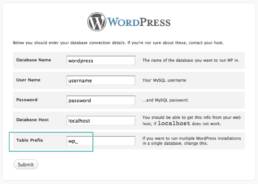
Change table’s prefix
When installing, WordPress will create the tables for you through a guided interface. Remember to specify a personalized prefix for tables using a short string.
File wp-config.php
The wp-config.php file is one of the most important in WordPress.
It contains security keys, that are random variables that improve cryptography.
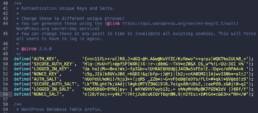
We advise you to protect the access adding this rule in your htaccess file:
<files wp-config.php>
order allow,deny
deny from all
</files>
Inside the Aspect voice appears an Editor default voice, through which is possible to modify the code of the theme and of the plugins installed. It’s easy to understand how, in case your login will be violated, anyone could access this section and modify hopelessly to your file. Don’t be scared though! Disabling this function is really simple.
It will be enough to add this code in your wp-config.php file.
define('DISALLOW_FILE_EDIT', true);
Plan your backups
Schedule your site backups daily. This allows you to restore in any moment the last version before an eventual attack, losing the least possible number of data, contents and information.
Make sure you uploaded a version prior to the violation, to not incur in this problem anymore.
Use a href=”https://sitecheck.sucuri.net” target=”_blank” rel=”noopener”>this online tool for your check.
Related post

January Digital News
2026 kicks off with new developments in the digital landscape. Social platforms…

December Digital News
We wrap up the year with the digital news of December 2025: increasingly…

November Digital News
From advanced features for creators to new AI solutions, security tools, and…